nano-banana.com has evolved into EIMG AI, now at eimg.ai. Your account, credits, and creations are all here—bookmark our new address so you can always find us.

EIMG AI logoEIMG AI
  • Nano Banana 2NEW
  • Nano Banana Pro
  • My Creations
Upgrade Now
EIMG AI logoEIMG AI
Create New
Navigation
  • Home
  • GPT Image 2.5New
  • AI Generator
  • Nano Banana Pro
  • Nano Banana 2New
  • GPT Image 2.5New
  • Seedream 5.0 ProNew
  • GPT Image 2New
  • Text to Image
  • Image to Image
  • Image UpscalerNew
  • LoRAHot
  • Explore
  • Projects
  • API
OPENAI IMAGE MODEL · FLARE + SUNBURST

GPT Image 2.5 AI Image Generator

GPT Image 2.5 is an AI image generator and editor built for sharper detail, more faithful reference-led creation, precise local changes, and steadier refinement across multiple edits. Choose Flare when iteration speed matters or Sunburst when the final image demands tighter control.

Turn a written brief into a structured GPT Image 2.5 workflow with clear references, constraints, and review criteria for every generation and edit.

Select Model

This will cost 10 credits (1K resolution).Credits available: 0
Max 20000 characters

Aspect Ratio

Resolution

Result

3D Case Presentation
Flare for faster iteration

Start with Flare for everyday generation, social creative, rapid concepts, and high-volume workflows where response time is the priority.

Sunburst for precision

Use Sunburst for polished product imagery, campaign assets, complex compositions, and edits that need the strongest available quality.

Generate, edit, refine

Move from a written brief to reference-guided changes, then revise one decision at a time while restating the details that must remain stable.

MODEL OVERVIEW

What is GPT Image 2.5?

GPT Image 2.5 is OpenAI’s image-generation family for creating and editing images from text and image inputs. It includes GPT-Image-2.5 Flare, a smaller model optimized for speed, and GPT-Image-2.5 Sunburst, a base model optimized for image quality and editing precision.

The practical change is not merely a sharper first render. GPT Image 2.5 is designed around the complete creative loop: establish a composition, anchor it to a person or product reference, make a focused change, and continue refining without needlessly rebuilding every approved choice. Better subject preservation helps a familiar face, garment, package, or prop remain recognizable when the setting, crop, lighting, or style changes.

Precise image editing matters when a visual is already mostly correct. Instead of asking for a full redraw, identify the object or region to change and describe what must remain untouched. The model is better at keeping composition, subject identity, and brand treatment stable while changing a background, product detail, color, or line of copy. Multi-turn image editing extends that discipline across a sequence, although every important invariant should still be checked after each result.

The family also improves natural lighting, material texture, complex layout handling, real-world information, and transparent background generation. Those strengths make the model useful beyond one-shot illustration: it can support product cutouts, poster systems, UI concepts, presentation graphics, campaign variations, and reference-led portrait work when the brief states hierarchy and constraints clearly.

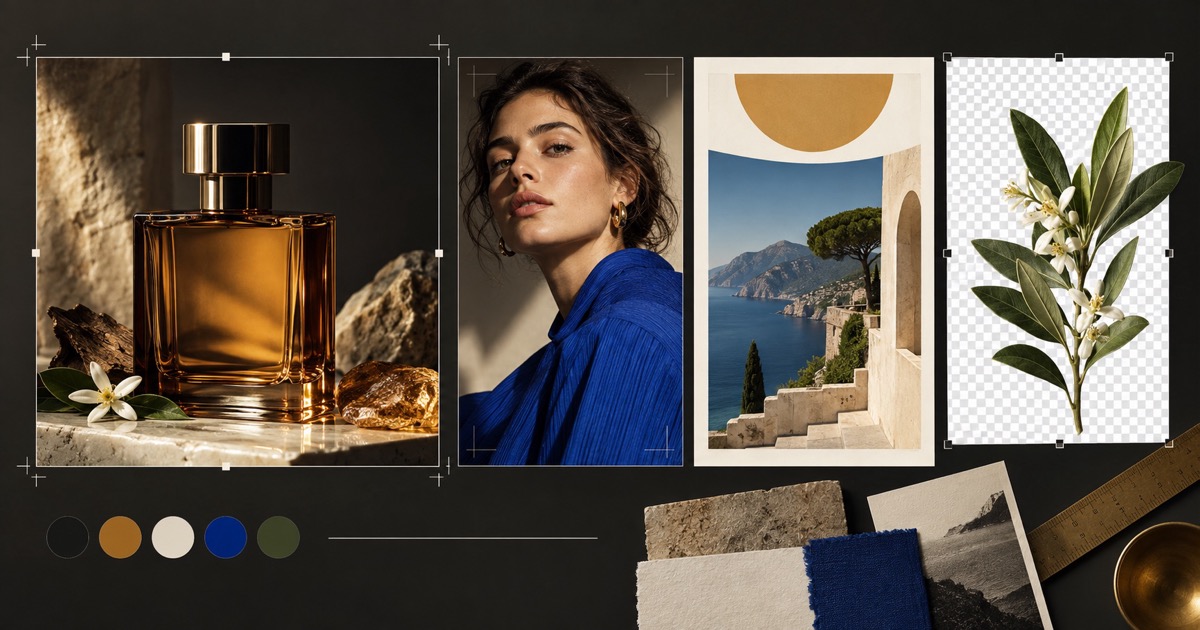
Editorial concept board with product, portrait, travel layout, and transparent botanical asset
EIMG AI concept artwork illustrating product fidelity, consistent portrait direction, layout control, and transparent-asset planning. It is not presented as a GPT Image 2.5 benchmark or model output.
CORE CAPABILITIES

Why GPT Image 2.5 changes the editing workflow

The useful improvements appear when a project must preserve approved details, make controlled revisions, or move between fast exploration and premium finishing.

Sharper detail and richer texture

Fine surfaces such as glass edges, woven fabric, paper grain, skin, metal reflections, and natural shadows receive more coherent treatment. The benefit is most visible when a product or portrait must survive a close crop instead of only looking plausible as a thumbnail.

Prompt with observable material behavior: thick amber glass, brushed aluminum, porous limestone, directional daylight, and soft edge reflections.
Stronger reference-subject fidelity

Reference image fidelity helps a person, pet, garment, product silhouette, or distinctive object remain recognizable when it moves into a new composition. This is valuable for a series where every frame needs continuity rather than a loosely similar substitute.

Name the reference role and list the features to preserve, such as face shape, hairline, bottle geometry, label proportions, or fabric construction.

Targeted edits with fewer surprises

The model is better at changing only the requested element while leaving the surrounding image intact. A focused edit can replace a backdrop, modify one product color, update a prop, or adjust a specific text block without automatically redesigning the whole scene.

Use a two-part instruction: state the exact change first, then list composition, subject, camera, lighting, and approved elements that must not change.

More dependable multi-turn refinement

A longer revision sequence is more useful when earlier decisions continue into the next version. GPT Image 2.5 improves consistency across successive edits so teams can move through color, crop, copy, and background changes as a controlled review process.

Change one variable per turn, keep an approved baseline, and inspect identity, geometry, text, transparency, and image quality after every revision.

Complex layouts and transparent assets

Better layout understanding supports posters, presentation visuals, interface concepts, and structured brand compositions. Transparent background generation also creates a cleaner starting point for catalog cutouts, stickers, icons, and assets that must be placed in another design.

Request transparency explicitly, choose PNG or WebP, and inspect the alpha edge around hair, glass, shadows, foliage, and fine product details.

A clear speed–quality choice

Flare and Sunburst let a workflow separate exploration from finishing. Flare is the practical starting point for faster high-quality generation; Sunburst is the stronger candidate when a complex edit or premium deliverable needs additional precision.

Compare both variants with the same prompt, references, size, and quality setting. Choose from accepted output quality, not from a model name alone.

CONCEPT EXAMPLES

Three briefs that use the model’s strengths

These original illustrations explain the kind of product, identity, and layout constraints that belong in a strong GPT Image 2.5 prompt. They are concept examples, not claimed model results.

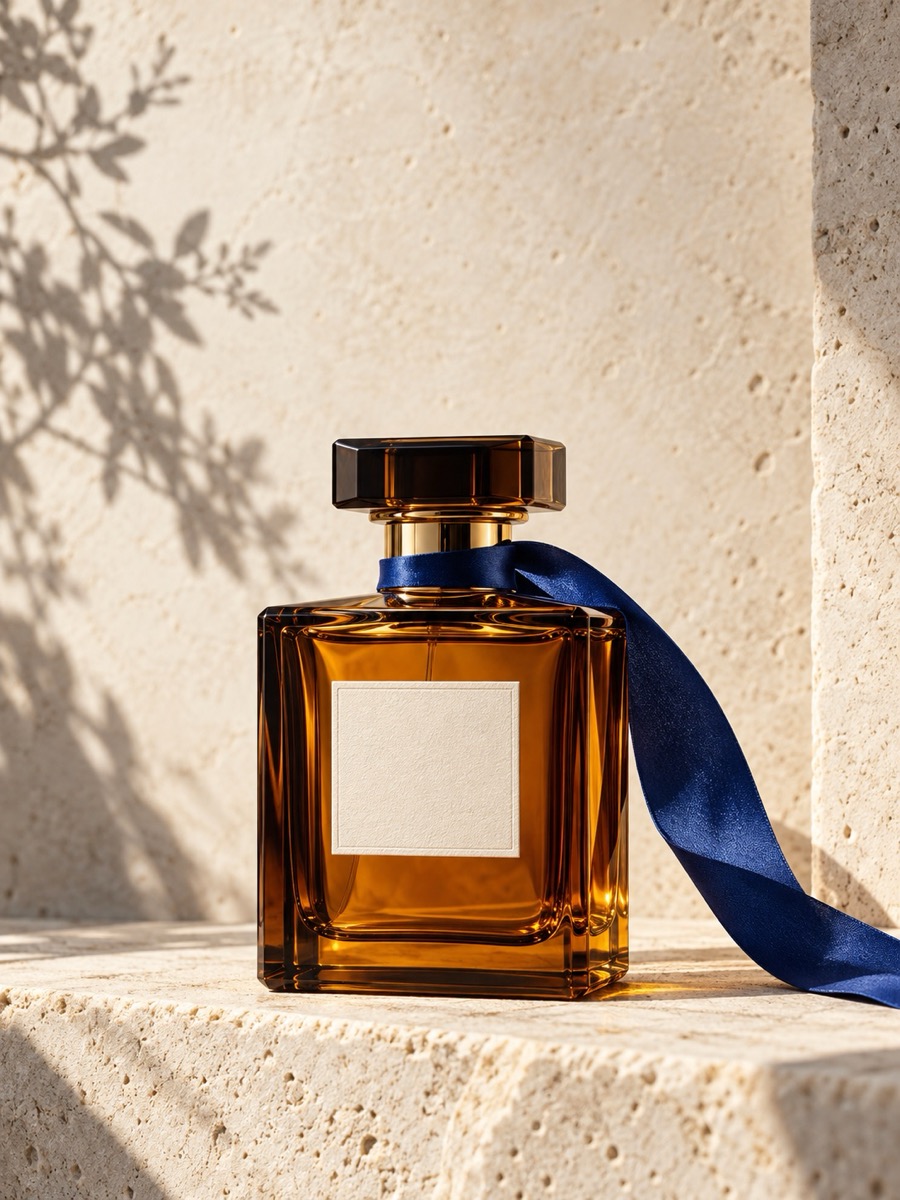
Amber perfume bottle with a cobalt ribbon on warm limestone
PRODUCT DETAILEIMG concept example

Material-accurate product direction

A simple fragrance bottle exposes small errors quickly: cap symmetry, glass thickness, ribbon folds, label alignment, reflections, and contact shadows all need to agree. A production brief should describe those physical relationships before adding broad style words.

Prompt direction: Create a 3:4 luxury product photograph of one rectangular amber-glass fragrance bottle on pale limestone. Preserve straight bottle geometry and a blank cream label. Add one cobalt ribbon, warm directional daylight, soft botanical shadow, realistic refraction, and generous copy-safe space above. No logo or readable text.

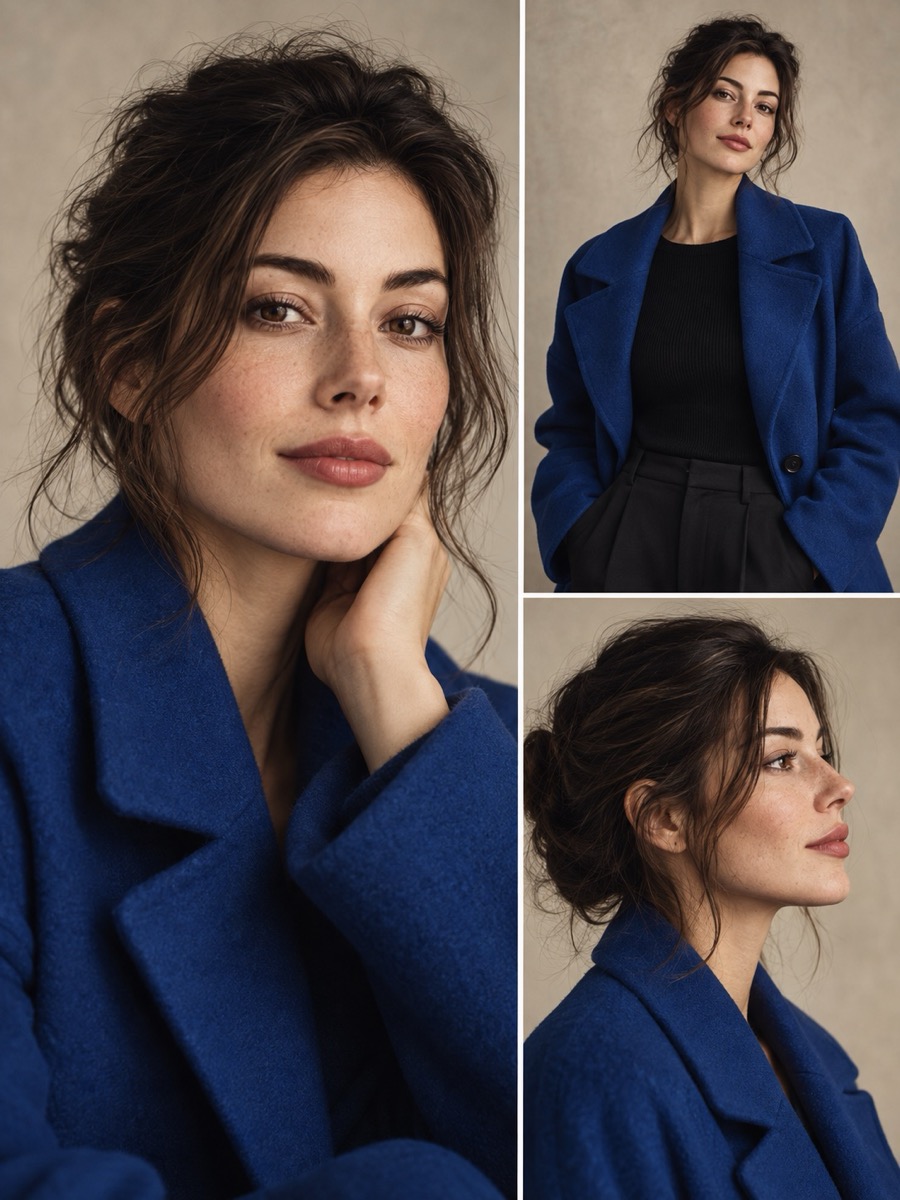
Three coordinated editorial portraits of the same woman in a cobalt coat
REFERENCE FIDELITYEIMG concept example

Identity across coordinated crops

A portrait series tests whether face shape, hair, clothing, and overall character survive camera changes. The brief assigns one subject and one garment as invariants, then permits only framing and angle to vary across the contact sheet.

Prompt direction: Build a clean editorial triptych of the same fictional adult woman wearing the same cobalt wool coat: close portrait, waist-up view, and side profile. Keep facial identity, hair, garment construction, neutral studio backdrop, and soft window light consistent. Change only camera distance and angle.

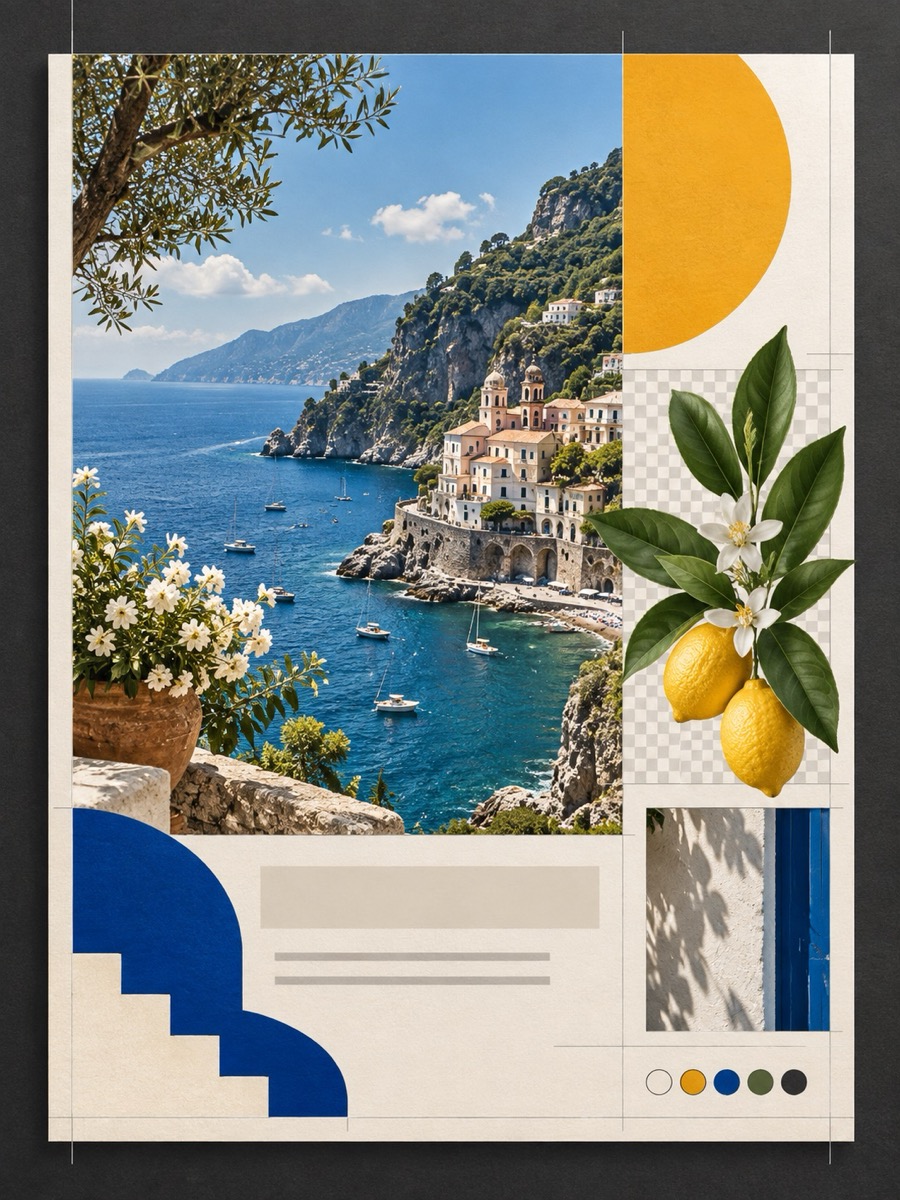
Mediterranean travel design board with a botanical cutout and geometric layout
LAYOUT CONTROLEIMG concept example

Layout plus isolated assets

A travel board combines photography, geometric hierarchy, paper texture, and an isolated botanical element. It shows why a complex brief should name the role of every region and separate the content layer from the transparent asset requirement.

Prompt direction: Design a 3:4 Mediterranean travel poster system with one coastal photograph, restrained amber and cobalt geometry, an ivory paper grid, and a separate lemon-branch cutout displayed on a transparency checkerboard. Leave all type areas blank; maintain crisp margins and print-ready hierarchy.

PRACTICAL WORKFLOW

How to plan a GPT Image 2.5 generation or edit

Treat the prompt as a creative specification, assign references explicit jobs, and evaluate the full image before moving to the next revision.

  1. 01

    Define the finished deliverable

    Start with the intended surface: a 16:9 website hero, 4:5 social advertisement, 3:4 editorial cover, transparent product cutout, or presentation diagram. Then define subject, composition, hierarchy, camera, lighting, materials, and any exact on-image copy. A clear destination gives every visual decision a reason.

  2. 02

    Assign references and invariants

    State what each input controls: identity, product shape, pose, garment, palette, layout, or environment. For an edit, specify both the requested change and the approved elements that must remain stable. This is more reliable than asking the model to infer which details matter most.

  3. 03

    Choose Flare or Sunburst deliberately

    Begin with Flare when rapid exploration is the goal or when an existing GPT Image 2 workflow already meets its quality bar. Begin with Sunburst when difficult text, product geometry, subject preservation, or a complex local edit needs the strongest quality candidate. Keep inputs and settings stable during the comparison.

  4. 04

    Refine one decision at a time

    Review the entire result for unwanted changes, then revise one variable—such as background color, crop, text placement, or prop—while restating the invariants. Save approved versions. If a region must remain pixel-identical, composite the accepted edit into the source rather than relying only on another generation turn.

MODEL SELECTION

GPT Image 2.5 Flare vs Sunburst vs GPT Image 2

The two 2.5 variants share improved precise editing and subject preservation, but they serve different production priorities. The best choice comes from testing the same real brief.

ModelRoleQuality directionEditing directionBest fit
GPT Image 2.5 FlareSmaller, speed-optimized modelHigh-quality everyday generation; positioned above GPT Image 2 quality with lower latency in OpenAI’s launch comparisonImproved precise edits and subject preservationSocial creative, product experiences, visual search, rapid prototyping, and higher-volume iteration
GPT Image 2.5 SunburstBase, quality-optimized modelHigher image quality than GPT Image 2 and the strongest 2.5 option for demanding outputTighter control for complex and premium editing workflowsCampaign creative, polished product imagery, detailed compositions, and quality-critical final assets
GPT Image 2Previous validated generation and editing modelA useful production baseline for migration testsEstablished image generation and edit workflowExisting integrations and prompts that already meet their acceptance criteria

OpenAI describes up to 50% lower latency for Flare compared with GPT Image 2. Actual response time and accepted quality depend on prompt, references, dimensions, quality settings, and workload; test them on your own representative examples.

PROMPT GUIDE

Write GPT Image 2.5 prompts as production briefs

Reliable prompts describe the deliverable, relationships, constraints, and review criteria. Style words help only after the composition and invariants are clear.

Complete prompt example

Create a 4:5 launch advertisement for a fictional mineral-water bottle. Center one clear ribbed-glass bottle on dark basalt, photographed at eye level with hard morning light from the left. Preserve the bottle silhouette, cap size, label proportions, and clear glass across revisions. The label reads “NORTH SPRING” in a restrained ivory sans serif. Leave the upper-right quarter quiet for campaign copy. Natural condensation, realistic contact shadow, amber accent line, no extra bottles, no hands, no unrelated text. For the next edit, change only the backdrop from basalt gray to warm limestone; keep every product and camera detail unchanged.

DELIVERABLE

Name the surface first

A web hero, packaging mockup, poster, catalog cutout, and slide illustration need different framing. Put format, aspect ratio, and placement constraints at the beginning so the model plans usable negative space and hierarchy.

COMPOSITION

Describe relationships

Replace loose lists with spatial instructions: the bottle is centered, the shadow falls left, the headline sits above the horizon, and the smaller object overlaps only the rear edge. Relationships make a complex composition easier to evaluate.

REFERENCES

Give each reference one job

Use reference one for identity, reference two for garment construction, and reference three for lighting. When roles conflict, state which reference wins for each feature instead of leaving the model to average them together.

TYPOGRAPHY

Quote exact image text

Place required wording in quotation marks and describe location, type style, case, and line breaks. Review every character. Even improved text rendering is not a substitute for proofreading a deliverable before publication.

INVARIANTS

Lock what must not change

For precise image editing, repeat the protected elements in every turn: identity, pose, product geometry, camera, palette, approved copy, and background structure. A concise invariant list reduces accidental redesign during refinement.

ALPHA

Evaluate transparency at the edge

Transparent background generation should be checked around hair, translucent glass, fabric fringe, leaf stems, soft shadows, and reflective metal. Ask for PNG or WebP and inspect the decoded alpha channel on both light and dark surfaces.

BEST-FIT WORK

Where GPT Image 2.5 is most useful

The model family is especially relevant when a visual must hold together through references, targeted changes, multiple formats, or a deliberate speed–quality decision.

Product and e-commerce imagery

Preserve product shape and recognizable packaging while exploring controlled backgrounds, seasonal scenes, camera crops, and material lighting. Sunburst suits demanding hero assets; Flare can accelerate variation and testing once the quality bar is known.

Campaign systems and social creative

Develop one art direction across landscape, square, portrait, and vertical placements. Keep subject, palette, visual hierarchy, and approved copy consistent while changing framing or a single offer element for each channel.

Posters, slides, and UI concepts

Use improved complex-layout understanding for presentation visuals, interface explorations, event posters, and structured information boards. Define grid, reading order, exact text, and quiet areas rather than relying on a generic “clean design” request.

Portrait and character continuity

Anchor a sequence to a reference subject while changing scene, camera angle, clothing context, or art direction. Review recognizable features after every turn and keep identity constraints separate from style references.

Transparent production assets

Create isolated product, botanical, sticker, icon-like, or merchandise elements for placement in another layout. Inspect alpha quality carefully and keep a compositing fallback for edges that must be technically exact.

Focused revision workflows

Change a background, colorway, object, crop, or line of copy without discarding an otherwise approved image. Save baselines, request one change at a time, and compare the full result instead of checking only the edited region.

MODEL FAQ

GPT Image 2.5 questions, answered

Clear answers about model variants, editing behavior, output controls, prompts, and practical workflow decisions.

PLAN THE NEXT IMAGE

Turn a vague idea into a controlled visual brief

Shape your prompt, prepare references, and move from exploration to a controlled final image with a speed-first or precision-first workflow.

Read the OpenAI model page
Explore GPT Image 2Open text-to-imageOpen image-to-imageBrowse AI image models
EIMG AI logoEIMG AI

Create Stunning Images with AI

Product
  • Pricing
  • Blog
  • FAQ
Other Services
  • Nano Banana Pro
  • Nano Banana 2
  • Nano Banana 2 Lite
  • Veo 3.1
  • Seedance 2.0
  • Gemini Omni
  • Sora 2
  • Prompts
  • AI Shorts
Legal
  • Cookie Policy
  • Refund Policy
  • Privacy Policy
  • Terms of Service
Company
  • support@eimg.ai
  • AITOOLVERSE LTD
  • Office 15761 Initial Business Centre, Unit 7 Wilson Business Park, Manchester, England, M40 8WN, United Kingdom
© 2026 EIMG AI All Rights Reserved.•@Aitoolverse
Stripe ClimateContact