

Built for production structure
The Pro tier centers on editable, information-dense, and layout-sensitive work: annotated changes, sketch-to-render direction, multilingual designs, and professional content systems.
Turn complex briefs into structured visual systems. Seedream 5.0 Pro combines advanced reasoning, high-density information design, spatially guided editing, photographic realism, and native multilingual generation for professional creative production.
Select Model
Aspect Ratio
Output Format
Resolution
Cost: 16 credits
Image count
Multiple images generate in parallel. Credits are charged per image.
Seedream 5.0 Pro is ByteDance Seed’s professional multimodal image-generation model. It combines advanced reasoning with text-to-image creation, reference-guided editing, dense information design, spatial annotation control, layer separation, photographic rendering, and native multilingual generation for commercial, educational, and design-heavy visual workflows.
EIMG supports text-to-image and reference-guided editing at 1K or 2K, plus layer decomposition at 1K, 1.5K, or 2K. The layer workflow returns four editable layers and one complete base image.
The Pro tier centers on editable, information-dense, and layout-sensitive work: annotated changes, sketch-to-render direction, multilingual designs, and professional content systems.
Seedream 5.0 Lite emphasizes broad reasoning and knowledge-rich creation. The Pro release moves further toward professional editing control, high-density layouts, layer separation, and production-oriented visual quality.
The strongest reasons to choose the Pro model are not vague “better quality” claims. They are concrete workflow capabilities published by ByteDance Seed and supported by current provider documentation.
Organize complex facts, diagrams, charts, measurements, and text-rich layouts into one coherent visual for education, research, product documentation, and presentations.
Respond to boxes, arrows, handwritten notes, and sketch-based direction so edits can target a location or preserve an intended layout instead of redrawing the whole scene.
Separate image elements into editable layers for downstream design work, opening a more production-friendly path than a single flattened render.
Recreate believable physical lighting, natural shadows, material response, and human skin texture for product, lifestyle, portrait, and campaign imagery.
Prompt and generate across a dozen widely used languages, including multilingual layouts and right-to-left localization workflows.
Use several references to preserve a character, product, style, pose, or environment and combine visual cues into a controlled new composition.
From dense information design and commercial product imagery to sketch-guided editing, these examples show the professional workflows suited to Seedream 5.0 Pro.
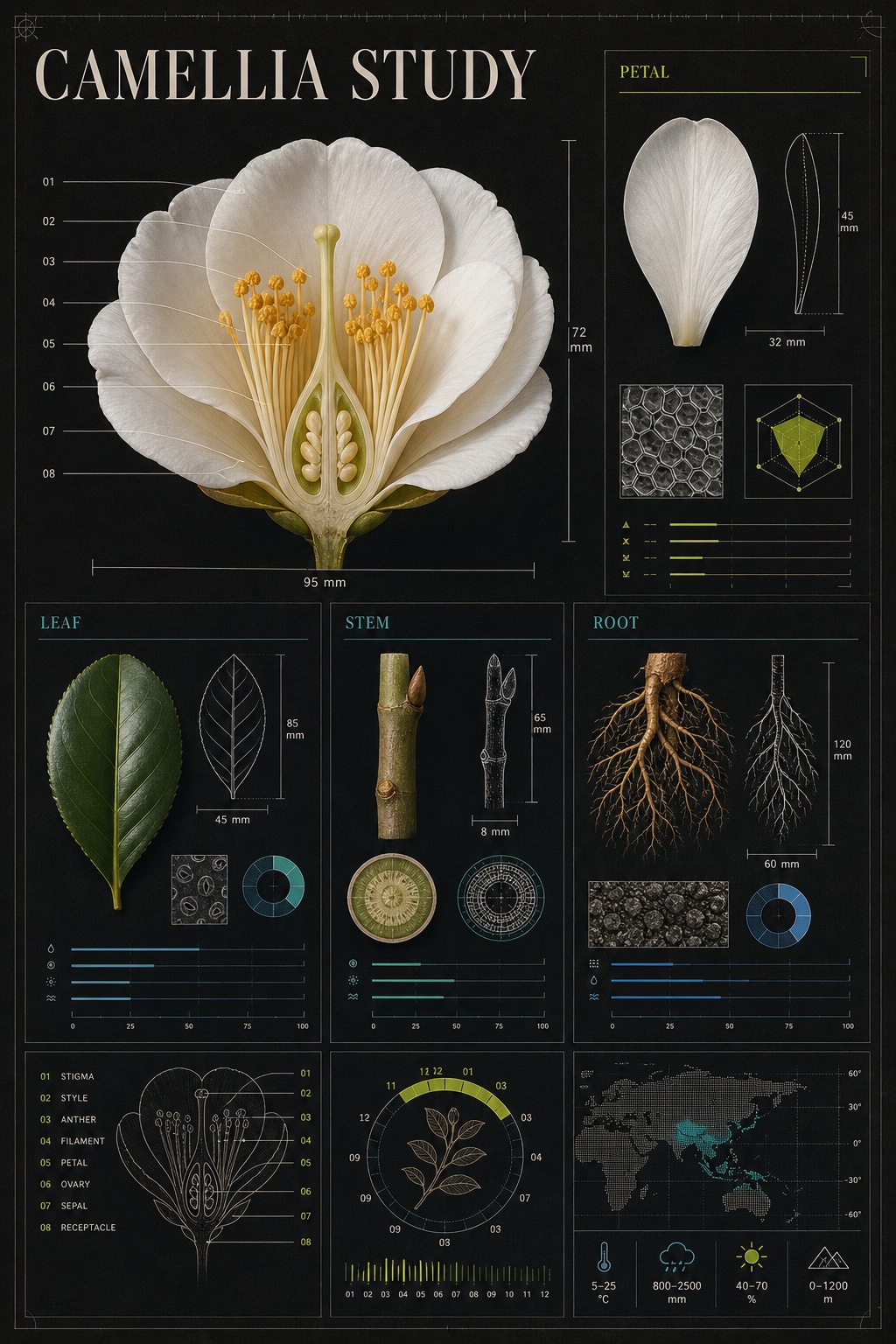
A botanical study combines a hero specimen, cutaway anatomy, measured callouts, charts, and a disciplined hierarchy—exactly the kind of dense, structured brief the Pro model targets.

Controlled glass, aluminum, stone, textile, and reflections demonstrate how a professional brief should describe material behavior instead of relying on generic style words.

A preserved camera angle and layout move from architectural construction lines into a finished interior, showing the value of sketch and spatial guidance.
Treat the prompt as a design brief, use references as explicit constraints, and choose output settings for the final surface.
Define the subject, audience, information hierarchy, scene, materials, lighting, exact on-image text, and intended use. Lead with what must remain true before adding style language.
State whether each image controls identity, product shape, pose, palette, layout, or environment. For edits, repeat what must stay unchanged and describe the exact region to modify.
Select 1K for faster web iteration or 2K for higher-detail output, then match the ratio to the surface: square, portrait, landscape, vertical story, or 21:9 cinematic banner.
The right model depends on the job. Provider endpoints can expose different limits, so compare the production focus before comparing a single resolution number.
| Model | Positioning | Common provider output | Best-fit strengths |
|---|---|---|---|
Seedream 5.0 Pro Professional | Production-oriented multimodal image model | 1K / 2K on EIMG | Dense infographics, annotation edits, layer separation, multilingual layouts, photographic work, and multi-reference composition |
Seedream 5.0 Lite Reasoning | Knowledge-rich general image generation | 2K / 3K on common public endpoints | Deep reasoning, broad knowledge, educational visuals, office productivity, and everyday image generation |
Seedream 4.5 Previous | Earlier unified generation and editing model | Endpoint dependent | Cinematic aesthetics, spatial understanding, reference consistency, and established general-purpose editing workflows |
Resolution and input limits above describe commonly documented provider endpoints, not a universal promise for every Seedream deployment.
Seedream 5.0 Pro benefits from clear hierarchy, spatial language, explicit invariants, and delivery-aware framing.
Say “16:9 e-commerce hero,” “4:5 safety infographic,” or “3:4 editorial cover” before describing style so composition serves a real surface.
List required sections, charts, labels, reading order, and visual hierarchy. Quote every important text string and prohibit unrequested copy.
Describe regions, alignment, relative scale, and preserved geometry. For annotated edits, map each arrow or box to one requested change.
Write “change only the lighting; keep identity, pose, camera, clothing, and background geometry unchanged” to reduce unwanted redraws.
Replace vague words such as “premium” with observable behavior: brushed aluminum, thick refractive glass, porous basalt, or woven fibers.
Use “reference 1 for identity, reference 2 for garment shape, reference 3 for lighting” instead of asking the model to infer how images should combine.
The model is especially relevant when visual quality, information structure, localization, and revision control all matter.
Build explainers, technical diagrams, learning posters, scientific overviews, and presentation visuals with stronger hierarchy and information density.
Develop product hero images, campaign key art, posters, social assets, and localized creative with more deliberate art direction.
Use reference-guided composition to maintain product shape, finish, packaging cues, and series consistency across multiple scenes.
Turn sketches and spatial annotations into polished concepts while preserving layout, camera perspective, materials, and requested structural details.
Create text-rich covers, cultural posters, localized menus, public information graphics, and mixed-language layouts.
Guide targeted changes with boxes, arrows, sketches, and natural-language constraints while keeping the rest of the image stable.
Verified answers about model positioning, supported workflows, current endpoint parameters, and what is live on this EIMG page.
Model capabilities are grounded in ByteDance Seed’s official Seedream 5.0 Pro page. Endpoint parameters are cross-checked against the API documentation supplied in this repository and current public provider guides. Limits can vary by provider.
Turn a structured brief into a finished visual, guide a precise edit with up to 10 references, or separate one image into four editable layers and a base image.
Explore live AI image tools